
Month: May 2021

  • Apple iMac 27-inch 2010 Power issues repair
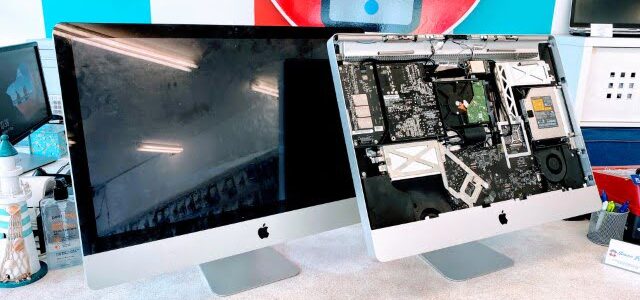
    Apple iMac 27-inch 2010 Power issues repair

    Apple iMac 27-inch 2010 A1213 Power issues repairs

    iMac 2010 27-inch repairs

    We got a very dusty 27-inch iMac from 2010. Due to overheating, the Power Supply Unit was damaged and the HDD was slightly damaged. Completely clogged air vents caused the temperature inside the iMac to rise considerably and corrupted the computer. If you hear that your iMac fan is way too loud, even when it’s not under heavy load, your iMac may need cleaning. Don’t wait until it’s too late.
    iMac repairs price list

    iMac 2010 27-inch repairs
    iMac 2010 27-inch repairs

  • iPhone Performance Management

    iPhone Performance Management

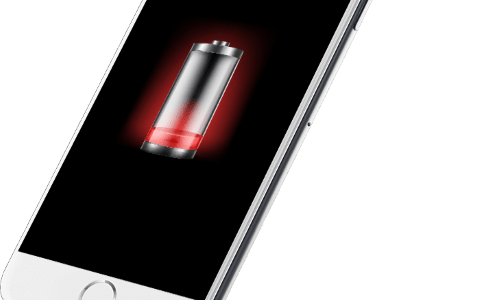
    iPhone empty battery

    iPhone Performance Management

    Battery, its health and impact on iPhone performance

    A lithium-ion battery is a complex part of your phone. The battery contains many elements inside that ensure safe charging and discharging of your phone. If the iOS operating system detects problems with the battery, it can significantly reduce the phone’s performance to prevent damage. As time and charge cycles progress, the battery capacity decreases. Then you have to charge your iPhone more and more often, and in the final life cycle of the battery, the phone suddenly starts to turn off by itself. It means it’s time to replace the battery of your phone.

    How to care for the iPhone battery

    By taking care of the battery, you will extend its service life

    Lithium-ion batteries were a major technological leap compared to older nickel-cadmium batteries. Lithium-ion batteries charge faster, last longer and have a higher power density, which ensures they last longer despite their smaller size. The batteries in the iPhone should function without problems for 1000 charge cycles. However, you should make sure that the iPhone is at least half-charged if you intend not to use it for a while. Leaving the iPhone with an empty battery will significantly shorten its lifespan. It would help if you also were very careful not to expose the iPhone to extreme temperatures. For example, in the summer, in the sun in a hot car. Something like that can drastically shorten the battery life and, in extreme cases, can cause the battery to swell and even cause a fire.

    I replaced the battery, and my iPhone performance dropped significantly after that.

    How does the battery affect the speed of the iPhone?

    iPhone Performance Management 1

    The iOS operating system constantly reads information from the battery about its temperature, state of charge and internal impedance. If the new battery is of poor quality, it may not be sending iOS information or sending incorrect data. IOS then slows down the CPU speed to prevent overheating of the battery. Therefore, it is essential to use high-quality batteries and check that the battery communicates correctly with the iOS operating system. At Phones Rescue, we use the highest quality OEM batteries to ensure that your iPhone will function properly after the battery replacement.

    Symptoms of reduced performance

    When your iPhone’s battery starts to die, or if you have a poor-quality battery in your iPhone, it can severely affect the performance of your entire phone.

    • Your applications take noticeably longer to run.
    • Background applications restart after waking up.
    • Lower frame rate as you scroll the screen—visible screen lag.
    • The camera flash may not work correctly.
    • Lower the screen backlight more often to save battery power.
    • Lower the frame rate in games and applications.
    • Much lower speaker volume.

    How at Phones Rescue we test the battery and the iPhone?

    Battery testing, charging IC, charging port and flex, mainboard testing.

    iPhone repairing

    First, we check the health of the battery installed in the iPhone. Next, we test the number of charging cycles, its internal impedance, and the age of the battery. Next, we check that the battery has not swelled and that there are no gas leaks.

    We check that the charging port is not damaged, that the pins are not bent or broken, and that there are no signs of corrosion. Then, if necessary, we clean or replace the damaged charging port.

    We test the charging IC, which is responsible not only for charging but also for USB communication. If it is damaged, it may cause the battery to discharge much faster.

    We also check that the motherboard has no visible traces of moisture and corrosion, and we also check that the logic board does not make a short circuit that could cause battery discharge.

    Read more about our professional battery testing and replacement.


    Read more

    Are you thinking about replacing the battery and would like to know how much does it cost?

    Check the iPhone repair price list on our website.


    iPhone repair price list